
Shipping Insurance

How can I check the status of my claim?

You can check the status of your claim in your ShipSaver account. Just follow these steps:

Go to https://www.shipsaver.com and login.

Go to the Shipments page and find the lost/damaged shipment by searching with the tracking number, item number, or customer name.

You can also find all your claims using the Claim Filed filter.
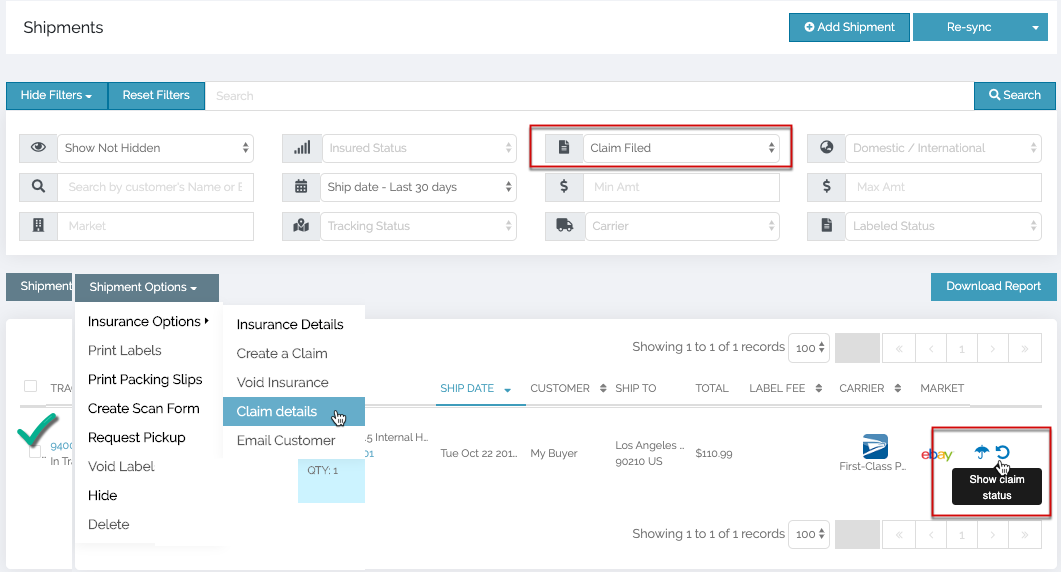
ShipSaver Shipments page with claim filters, claim details, and claim status controls highlighted

This will take you to the claim details page, where you will see the latest information on your claim status.
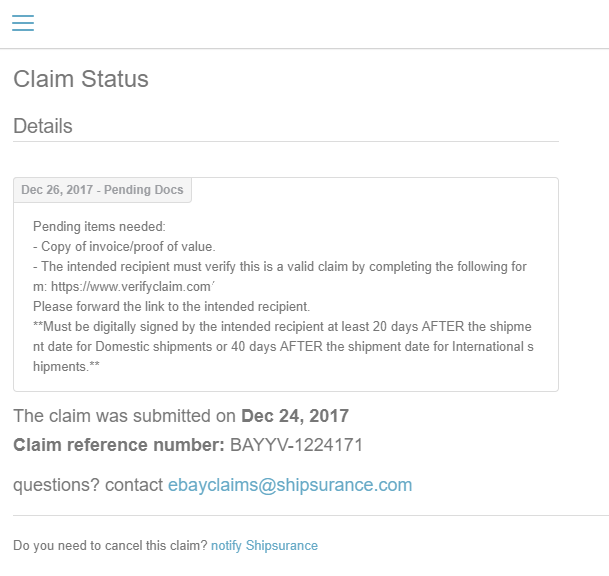
ShipSaver Claim Status page showing pending documentation and claim reference details
Browse all help articles
ShipSaver

Ship any package that originates within the United States to any domestic or global address.

Insure any ecommerce, commercial, or retail package that originates within the United States to any domestic or global address. ShipSaver insurance is intended for commercial purposes.

© 2026 ShipSaver, Inc.