
Tutorials

Combine Orders & Purchase Label

You can combine items from multiple orders into a single shipment.

  1. Go to the Orders screen.
  2. Use the search and filter options at the top of the page to find the items.
  3. Select the check boxes to the left of each item.
  4. Click the Order Options drop down, then click on Combine and Purchase Label.
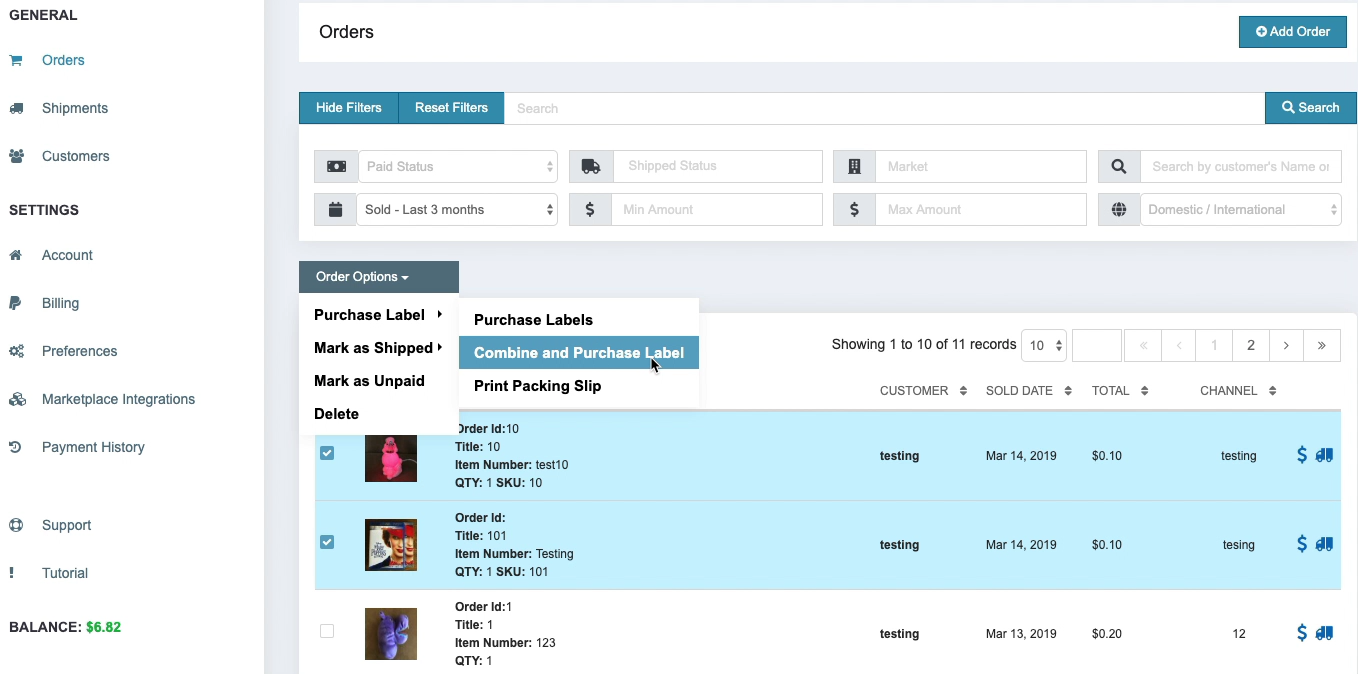
ShipSaver Orders page with multiple orders selected and Combine and Purchase Label highlighted
Browse all help articles
ShipSaver

Ship any package that originates within the United States to any domestic or global address.

Insure any ecommerce, commercial, or retail package that originates within the United States to any domestic or global address. ShipSaver insurance is intended for commercial purposes.

© 2026 ShipSaver, Inc.